YuJa Panorama is an all-in-one digital accessibility platform integrated directly into Moodle to help you meet WCAG 2.1 AA standards effortlessly.
For faculty, Panorama automatically scans your course files (PDFs, PowerPoints, Word docs) and provides a visual "Accessibility Gauge" along with clear, step-by-step instructions on how to fix issues like missing alt-text or improper heading structures.
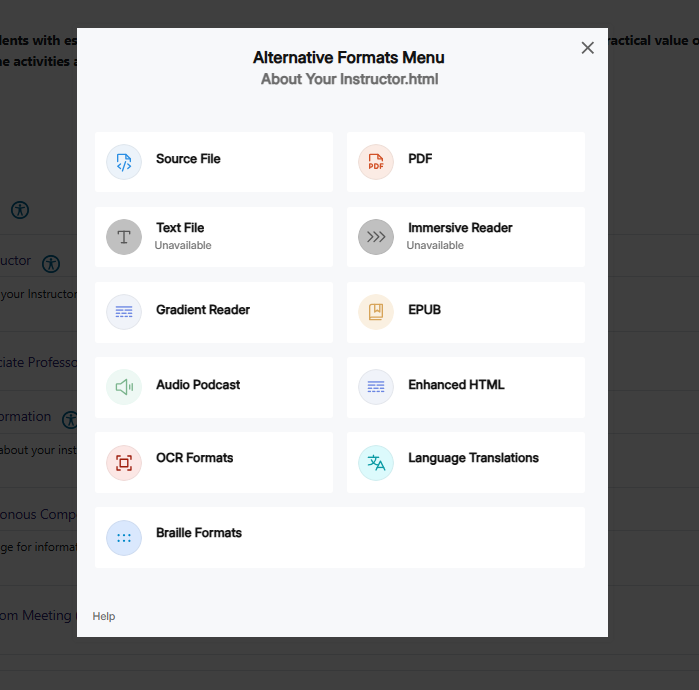
For students, it provides an "Alternative Formats" menu, allowing them to instantly convert your course materials into formats that best suit their learning needs—such as tagged PDFs, high-readability HTML, electronic Braille, or an automated audio podcast version of a lecture handout.
By working behind the scenes in Moodle, Panorama ensures that your digital content is inclusive and accessible to all learners without requiring you to be an accessibility expert.
Quick Key Features
Accessibility Reports: Get a bird's-eye view of your course's health score.
Remediation Engine: Fix common document issues (like missing descriptions) directly within the Moodle interface.
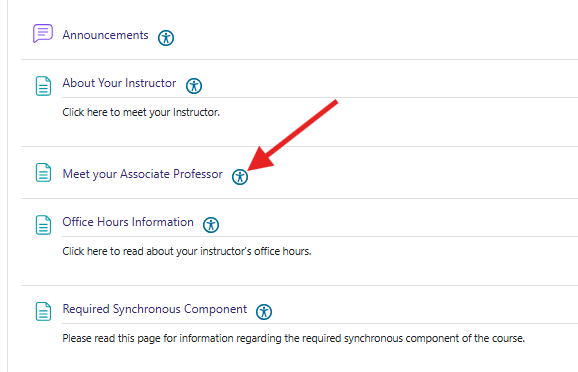
Student Choice: Students click the "Alternative Formats" icon next to any file to download the version that works for them.
Website Scans: It doesn't just check files; it also scans your Moodle HTML content for color contrast and link issues.
As an instructor, you will see a small color-coded Accessibility Gauge (icon) next to every file (PDF, Word, PPT) and Moodle activity you upload.
How it works: Panorama scans your files and assigns a score based on WCAG 2.1 AA standards.
What to do: Click the icon to open the Accessibility Report. It provides a step-by-step guide to fix issues like missing alt-text or incorrect heading structures directly within Moodle.
Icon & Color | Meaning | Action Needed |
Red  | Low Score (0-30%) | Significant barriers; needs immediate fix. |
Yellow  | Medium Score (31-84%) | Some issues; fix when possible. |
Green  | High Score (85-100%) | Little to no action required. |
What Students See:
Students will not have the ability to see the Red, Yellow & Green icons - they will only see a Blue - Student View Icon 
This Icon is clickable by the student and allows them Alternate formats for a file.